Pre-class Warmup Learning Challenge
This is a warmup learning challenge designed to help you refresh these skills and also to get you prepared for our first meeting.
Objectives
There are certain expectations about your skills and background you should have obtained from the pre-requisite courses.
- Github
- Javascript
- node.js
- npm
- gitbook
Due
4pm Monday, August 24 (before the class starts)
Expected time
30 minutes - 1 Hour
Tasks
Your challenge is to perform the following tasks:
Introduce yourself at the course forum (which is an issue tracker of a repository on Github) by leaving a comment following the example (name, department, favorite programming language, favorite food).
Make sure you have node.js and npm installed on your laptop. You will need to bring your laptop to the class each week to participate in the in-class hackathon.
We will use gitbook extensively to facility learning challenge and hackathons. Fork the warmup gitbook. Clone locally on your computer. Read gitbook to figure out how you can install the plugin specified in
book.jsonand serve the book locally on your own computer. If you succeed, you should be able to see something like below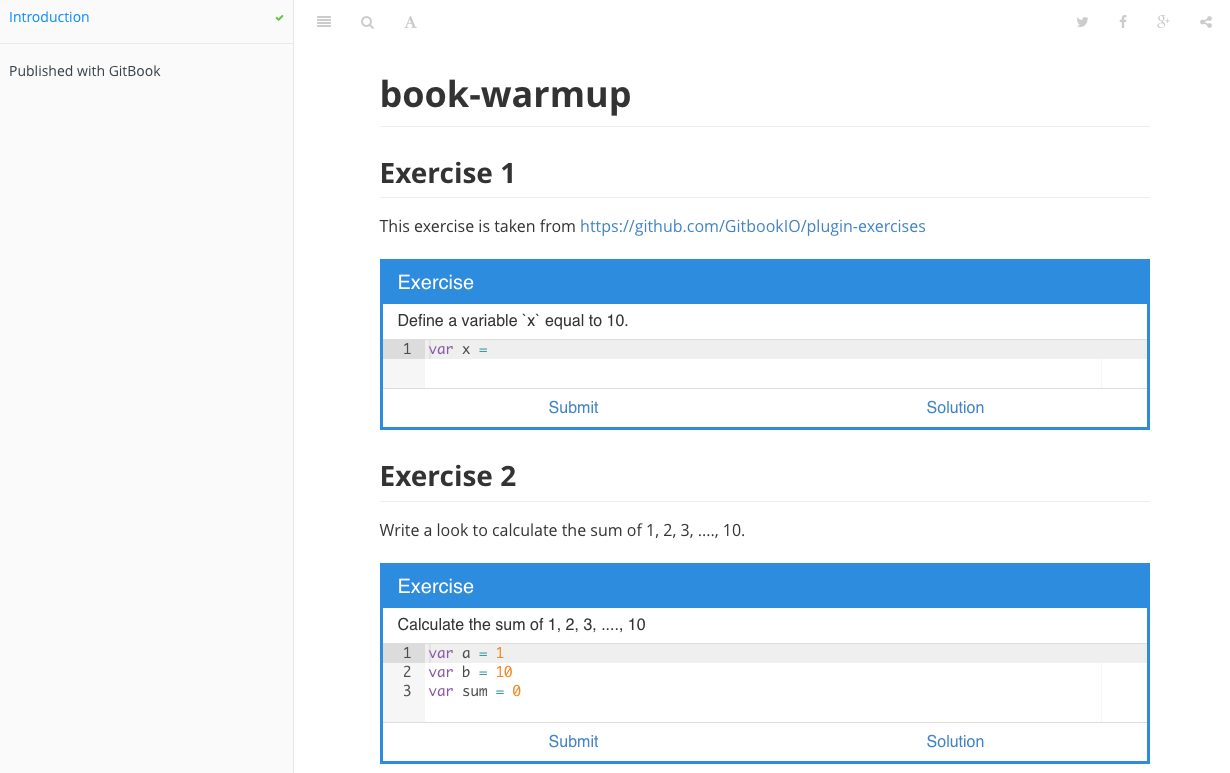
This warmup gitbook contains two Javascript exercises using the exercises plugin. The second exercise is incomplete. The solution is still missing. Can you complete this exercise? Once you did, commit and push your changes to your own fork. Then make a pull request.
Once you have completed the four tasks above, you should have refreshed your skills and knowledge about Github, Javascript, node.js, npm, and also learned something new about gitbook.
Submission
If you have successfully made a pull request, your submission will show up on this page, which lists all the pull requests made to it. This will be the default submission mechanism you will use a lot this semester.
Extra Challenge (Optional)
For those of you who are more ambitious, try to publish your warmup gitbook to
gh-pages. You can either follow the official instructions or use the
git subtree technique.
$ git subtree push --prefix _book origin gh-pages
Note that the folder _book is where gitbook outputs all the generated files
for the book when you run gitbook build. It would be interesting to find out how many
students opt to take on this extra challenge prior to our first meeting.